Chrome Music Lab production used to demand thousands of dollars in bulky studio gear and highly intimidating desktop software that took months to learn. Today, advanced browser-based environments have completely democratized the creative process for the masses, tearing down those historic financial barriers. If you want to jump straight into making beats, synthesizing tones, or understanding complex melodies without reading a dense manual, Chrome Music Lab is arguably the most intuitive starting point on the web. It successfully strips away all the unnecessary technical jargon, leaving you with pure, unadulterated musical exploration that feels more like play than work.
One of the biggest hurdles to learning an instrument or launching a new digital audio workstation is the deeply frustrating setup phase. Thankfully, there are no heavy gigabyte downloads, no mandatory user accounts, and absolutely zero paywalls to navigate here. Whether you are operating a high-end desktop computer in a studio, utilizing a standard classroom laptop, or just tapping on your smartphone screen during a daily commute, the interface responds flawlessly. The brilliant engineers behind Chrome Music Lab built these experiments utilizing open web technologies, successfully proving that modern internet browsers possess the raw computational power required for heavy, real-time audio processing.
Beyond just acting as a fun digital distraction for casual users, this dynamic platform serves a massive, tangible educational purpose globally. Progressive teachers utilize it to bridge the intimidating gap between abstract music theory and concrete mathematical science. By translating invisible sound waves into bright, highly interactive visual elements, concepts like frequency, pitch, and tempo suddenly make perfect sense to visual learners. It transforms a traditional, sometimes dry academic subject into a dynamic cross-curricular playground that naturally merges physics, algorithmic logic, and visual art into one cohesive experience.
Visualizing the Physics Behind Every Single Note
Imagine if you could quickly sketch a picture on a Chrome Music Lab blank digital canvas and instantly hear exactly what that painting sounds like. That is precisely the magical premise of the Kandinsky tool, which pays brilliant homage to the famous abstract artist who famously experienced synesthesia. You draw circles, squiggly lines, and sharp triangles on the screen, and the underlying audio engine immediately translates those geometric shapes into vocal sounds, percussive hits, and synthesizer tones. It functions as a highly effective method to teach children—and remind rigid adults—that visual composition and audio arrangement share the exact same fundamental structural DNA.
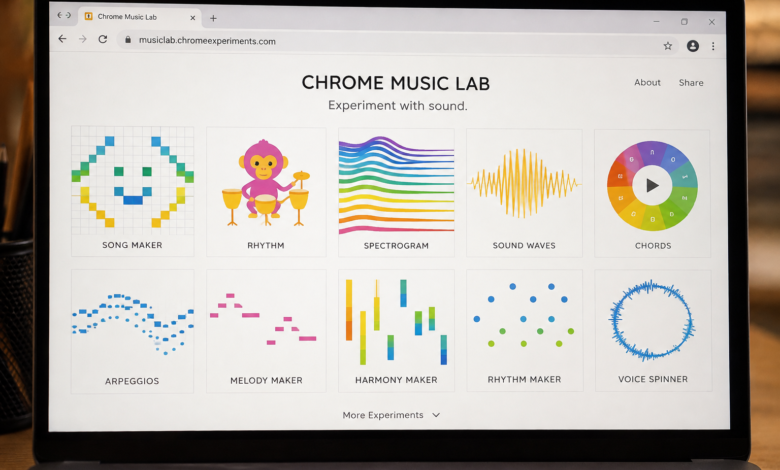
Moving deeper into the realm of raw acoustic physics, understanding how sound actually travels through the air can be notoriously difficult to articulate verbally. The Spectrogram feature acts as a vivid, colorful heat map that actively displays the specific frequencies of different instruments, bird chirps, or even your own raw microphone input in real time. Right alongside it, the Sound Waves experiment visually manifests what actually happens to invisible air molecules when a given pitch rapidly changes. You can literally watch how a high, piercing note produces rapid, tightly packed vibrations, whereas a low, booming bass note creates slow, rolling, expansive waves.
Sometimes you just need to get a little weird and experimental to truly grasp how audio manipulation works in professional environments. The Voice Spinner lets you record a quick audio snippet and manually scrub it back and forth like a seasoned vinyl DJ, actively teaching you how playback speed correlates directly to extreme pitch shifting. Meanwhile, the Oscillators experiment inside Chrome Music Lab gives charming, animated personalities to the essential building blocks of all electronic music. Cute characters graphically represent square, sawtooth, triangle, and sine waves, allowing you to intuitively grasp how altering a waveform produces entirely different sonic textures.
Crafting Intricate Beats and Melodies from Scratch

A solid, infectious rhythmic groove is the bedrock Chrome Music Lab foundation of almost every great song, yet reading traditional drum notation often looks like ancient hieroglyphics to an absolute beginner. The Rhythm module elegantly solves this universal problem by utilizing friendly animated monkeys and aliens who play various percussion instruments in a beautifully gamified interface. You simply place dots on a looping sequence grid to trigger high hats, snappy snares, and thumping kick drums. Because the interface relies entirely on visual spacing, experimenting with complex syncopation and odd time signatures feels more like solving a casual puzzle game than enduring tedious musical homework.
Once you have a steady, pulsing beat bouncing around in your head, the next logical step is hunting down an accompanying melodic tune. The Melody Maker actively strips traditional composition down to its absolute barest essentials to prevent creative paralysis. Time moves horizontally from left to right across the screen, Chrome Music Lab while the musical pitch scales vertically from bottom to top. By clicking on colorful, interactive blocks, you can map out a quick melodic sequence and instantly hear it play back, while a handy toggle button adds an automatic harmonizing echo to instantly thicken your arrangement.
For those who are finally ready to combine everything they have absorbed, the Song Maker stands out as the ultimate destination for budding producers. This specific module operates as a miniature digital audio workstation where you can rapidly build fully fleshed-out instrumental tracks. You get a robust, expansive grid to paint your intricate melodies, a dedicated bottom row for your drum patterns, and the granular ability to adjust the tempo, root scale, and instrument patches on the fly. When forward-thinking educators integrate Chrome Music Lab into their curriculum, this is almost always the flagship tool that keeps students happily engaged for hours on end.
Demystifying Advanced Theory Without the Headache
Music theory has historically carried a terrible reputation for being aggressively boring, Chrome Music Lab mostly because it is traditionally taught via strict rote memorization and endless chalkboard diagrams. The Chords tool fiercely flips this outdated script by letting you click any individual key on a virtual piano to instantly hear its corresponding major or minor triad. It visually highlights exactly which notes are being played simultaneously, entirely removing the frustrating guesswork from chord building. Similarly, the Arpeggios experiment features a spinning graphical wheel that gracefully breaks down complex chord structures into individual, harp-like plucked notes that are incredibly easy for the human ear to digest.
If you have ever stopped to wonder why an acoustic guitar sounds vastly different from a grand piano—even when both instruments are playing the exact same note—the answer lies heavily in the harmonic series. Exploring this advanced acoustic concept is incredibly straightforward within Chrome Music Lab, thanks to its highly interactive string simulations. By clicking on different sections of a digital string, you can clearly see and hear how dividing it into exact halves, thirds, or quarters produces specific mathematical intervals like octaves and perfect fifths. It takes a concept that usually requires a college-level acoustics degree to fully explain and makes it intuitively obvious in mere seconds.
Classical music can feel totally alien and inaccessible to younger generations if they cannot read traditional printed sheet music. The Piano Roll experiment acts as a brilliant, glowing bridge between the centuries-old classical world and the modern digital era. It takes legendary compositions, like a Bach prelude or a lively Mozart rondo, Chrome Music Lab and displays them as colorful cascading blocks falling onto a digital keyboard, looking strikingly similar to modern rhythm-based video games. Watching the intricate patterns of classical masterpieces visually unfold helps modern listeners appreciate the underlying structure and dramatic chord progressions without ever needing to interpret a single printed musical note.
Exploring Real-Time Collaboration and Open Source Power
Creating music is inherently a highly social, communal activity, and physical geographical distance should never prevent a fantastic jam session from occurring. The Shared Piano experiment inside Chrome Music Lab allows up to ten unique users to log into the exact same virtual keyboard room simultaneously from completely different devices. Whether you are a private teacher giving a remote piano lesson across town, or a group of scattered friends trying to coordinate a digital band practice, the real-time audio feedback is surprisingly snappy. It completely eliminates the dreary, disconnected isolation that so often plagues traditional web-based remote learning platforms.
What truly sets Chrome Music Lab this specific Google initiative apart from expensive, closed-ecosystem proprietary software is its generous open-source ethos. Advanced users, curious coders, and ambitious web developers do not just have to consume the tools exactly as they are initially presented; they can actually look deep under the digital hood. The underlying source code for many of these tools is completely accessible to the public. This open access heavily encourages computer science students to remix the code, boldly build their own unique interactive audio experiments, and actively contribute their findings back into the broader web development community.
The absolute worst part of digital music creation is usually dealing with massive audio files, incredibly slow rendering times, and nightmare format compatibility issues between different operating systems. When you create a sweeping masterpiece in Chrome Music Lab, saving your hard work happens entirely in the background without needing physical storage devices. The system packages your exact arrangement into a lightweight, easily shareable format that requires absolutely no heavy file exporting. You can seamlessly distribute your track to fellow producers, submit it directly into educational assignment portals, or showcase it to your peers, dramatically encouraging a rapid, iterative, and highly social creative process.
How This Ecosystem Rewires Our Brains for Creativity
When someone sits Chrome Music Lab down at a real acoustic piano for the very first time, awkwardly hitting the wrong key in front of others can feel deeply embarrassing and profoundly discouraging. Ingenious digital interfaces actively remove that crippling performance anxiety. Every single interaction within this specific digital ecosystem is carefully designed to sound somewhat musical, meaning there are essentially no “wrong” answers to be found. This built-in psychological safety net actively encourages pure, uninhibited experimentation, as users are far more likely to take wild creative risks when they absolutely know they can just hit the simple undo button without any lasting consequence.
While these powerful tools exist entirely in the digital realm, they are frequently utilized by professionals to heavily augment physical, tangible reality. Resourceful music instructors will often seamlessly combine these web applications with physical classroom instruments like wooden xylophones, hand drums, or colorful plastic ukuleles. A young student might intuitively compose a visual pattern on the glowing screen of Chrome Music Lab, and then the entire class enthusiastically tries to physically replicate that exact rhythmic pattern using real instruments. This clever hybrid approach ensures that digital screen time becomes a direct, potent catalyst for real-world collaboration and essential motor skill development.
Ultimately, the true, lasting value of Chrome Music Lab lies in how it seamlessly and quietly plants the initial seeds of deep musical literacy without the user even realizing they are learning. It does not loudly claim to replace professional, heavy-duty software utilized by Grammy-winning producers. Instead, it serves as the absolute perfect gateway into audio engineering, critical listening, and structural song composition. By the time a user naturally outgrows these playful, colorful experiments, they already intuitively understand the fundamental importance of tempo, complex waveforms, and visual sequencing, walking away with a genuine, lifelong appreciation for the boundless art of sound design.
You May Also Read