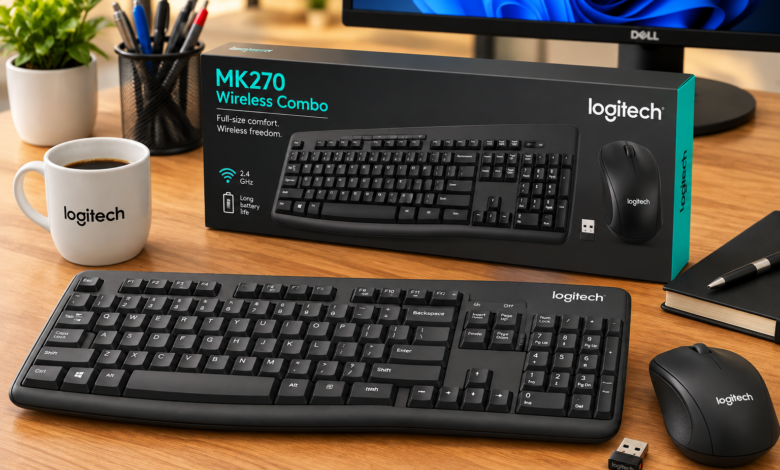
Logitech Keyboard and Mouse A good keyboard and mouse can change the way a computer feels to use. Whether you spend your day writing, working with spreadsheets, browsing the web, gaming, or simply answering emails, the right peripherals can make everyday tasks noticeably more comfortable. That is where a logitech keyboard and mouse setup can be worth considering.
Logitech has built a strong reputation around computer accessories, and its keyboard and mouse range covers a wide variety of needs. There are compact wireless combinations for small desks, ergonomic models designed for long working sessions, and performance-focused options aimed at gamers and power users.
The interesting part is that choosing the right combination is not necessarily about buying the most expensive model. Features such as connection type, battery life, key feel, mouse shape, customization, and desk space can matter much more. This guide looks at those factors so you can decide what type of setup makes sense for you.
Why Choose a Logitech Keyboard and Mouse
A major advantage of a logitech keyboard and mouse combination is the variety available within the same brand. Instead of being limited to one design philosophy, users can choose between basic office equipment, minimalist wireless products, ergonomic devices, and gaming-oriented peripherals.
For everyday users, that range can make the buying process easier. You might prefer a full-size keyboard with a number pad if you work with spreadsheets, while someone with a smaller desk may want a compact keyboard that leaves more room for a mouse.
There is also the convenience of having peripherals designed with modern computer setups in mind. Wireless connectivity, programmable controls, multi-device support, and rechargeable Logitech Keyboard and Mouse batteries are available across different Logitech product families, although the exact features depend on the model.
Wired or Wireless: Which Setup Makes More Sense?

The wired-versus-wireless decision is one of the first things worth considering. A wired keyboard and mouse generally provide a straightforward connection without worrying about batteries or charging. For a permanent desktop setup, that simplicity can be appealing.
Wireless equipment offers a different kind of convenience. Removing cables from the desk can make the workspace look cleaner and gives you more freedom to position the keyboard and mouse. It can be especially useful if you occasionally connect the same peripherals to different computers.
A modern wireless Logitech Keyboard and Mouse setup can also be practical for people who move between a desktop, laptop, and other compatible devices. However, wireless models introduce additional considerations, including battery life, connection method, and whether the device uses Bluetooth, a USB receiver, or both.
Understanding Keyboard Sizes
Keyboard size has a surprisingly large effect on the overall experience. A full-size model normally includes a dedicated number pad, navigation keys, function keys, and the standard typing area. For office workers and anyone who regularly enters numerical data, those extra keys can be genuinely useful.
Tenkeyless keyboards remove the number pad and Logitech Keyboard and Mouse reduce the overall footprint. That gives the mouse more room while keeping most of the familiar layout. It is a popular compromise for users who want a conventional typing experience without occupying the entire desk.
Compact and minimalist keyboards go even further. They can be particularly attractive for small workstations, laptop users, or people who prefer a clean desktop. The trade-off is that certain keys may be moved, combined, or removed, so compact layouts can take some getting used to.
What Makes a Keyboard Comfortable?
Comfort is more complicated than soft keys and a pleasant-looking design. The angle of the keyboard, key spacing, travel distance, wrist position, and typing style all influence how comfortable it feels during extended use.
Some people prefer low-profile keys because they feel quick and familiar, particularly if they spend most of their time typing on laptops. Others enjoy keyboards with more noticeable key travel because each press feels more deliberate.
Your working habits matter, too. Someone writing thousands of words each week may notice keyboard characteristics much more than a person who types only occasional messages. Before choosing a logitech keyboard and mouse, think about how many hours you actually spend interacting with your computer.
Choosing the Right Mouse Shape
A mouse can look excellent in photographs and still feel wrong in your hand. Shape is therefore one of the most important factors to consider. Your hand size, grip style, and preferred sensitivity all influence which design will feel natural.
Common grip styles include palm, claw, and fingertip grips. A larger mouse may suit someone who rests most of their hand on the device, while a smaller design can feel Logitech Keyboard and Mouse easier to control for users who keep their fingers more actively positioned.
Weight is another consideration. Some people like a lightweight mouse because it moves quickly across the desk. Others prefer something heavier because it feels more stable. Neither approach is universally better; personal preference makes a big difference.
Features Worth Looking For
Logitech Keyboard and Mouse and mice can include far more features than the basic input controls. Some keyboards offer programmable keys, backlighting, dedicated media controls, or device-switching buttons. Mice can provide adjustable sensitivity, additional side buttons, scrolling options, and customizable shortcuts.
For an office setup, you probably do not need every available feature. Quiet keys, comfortable ergonomics, reliable wireless connectivity, and a sensible layout may provide more value than flashy extras.
Gamers and creative professionals may have different priorities. Programmable buttons can be useful for repetitive tasks, while adjustable sensitivity can help users who frequently switch between detailed and fast movements. The best logitech keyboard and mouse combination is ultimately the one whose features match your actual routine.
Logitech Keyboard and Mouse for Office Work
Office users often benefit from equipment that simply disappears into the background. You want the keyboard to respond consistently and the mouse to move accurately without requiring constant attention.
A wireless setup can be particularly convenient in an office environment because it reduces cable clutter. It also makes it easier to clear the desk when the workspace needs to serve Logitech Keyboard and Mouse another purpose.
Noise is another factor worth remembering. If you work in a shared office, classroom, library, or home where someone else is nearby, quieter keys can make a noticeable difference. A keyboard that feels excellent to you may become annoying to everyone around you if every keystroke produces a loud click.
Logitech Keyboard and Mouse for Home Use
Home users have more freedom to choose based on personal preference. Your computer may be used for work during the day, entertainment in the evening, and general browsing at night, so versatility can be valuable.
A comfortable wireless combination can keep the desk tidy while allowing you to move the keyboard when you need more surface space. If the computer is connected to a large display, wireless peripherals can also make it easier to sit farther away from the screen.
For families sharing one computer, multi-device functionality can be particularly useful when available. It may allow a compatible keyboard or mouse to move between supported devices without physically reconnecting cables each time.
Gaming and Performance Considerations
Gaming introduces a different set of requirements. Response, key consistency, sensor performance, polling characteristics, button placement, and customization can all become more important during competitive play.
A gaming keyboard may offer features designed for fast input, while a gaming mouse can provide additional buttons and sensitivity controls. RGB lighting is popular as well, Logitech Keyboard and Mouse although lighting is primarily an aesthetic feature rather than something that automatically improves performance.
It is also important not to assume that gaming equipment is automatically better for everyone. Someone who spends eight hours writing reports may benefit more from an ergonomic keyboard than a performance-focused gaming model. Match the hardware to the activity instead of buying based on specifications alone.
Battery Life and Charging
Battery management is an easy detail to overlook when buying wireless peripherals. The convenience of removing cables disappears quickly if you constantly need to stop working and recharge the devices.
Different models use different approaches. Some wireless keyboards and mice rely on replaceable batteries, while others include rechargeable batteries. The practical choice depends on whether you prioritize maximum convenience, long intervals between battery changes, or the ability to recharge.
If you are building a logitech keyboard and mouse setup for regular work, check the manufacturer’s stated battery information for the exact models you are considering. Battery performance can vary significantly depending on features, usage patterns, lighting, and connection technology.
Software and Customization
Software can turn a basic peripheral into a more personalized tool. Depending on the model and product family, Logitech’s software ecosystem can provide options for customizing buttons, shortcuts, profiles, lighting, and other controls.
This can be particularly useful for people who repeat the same actions throughout the day. A programmable mouse button, for example, might launch a frequently used application or perform a repetitive command.
However, customization should not be the main reason you buy a device. Logitech Keyboard and Mouse If you never use programmable controls, paying extra for them may not provide much practical benefit. Consider software support a bonus that becomes valuable when it solves a specific problem.
Ergonomics and Long-Term Comfort
Ergonomics deserves more attention than it usually receives. If your keyboard and mouse are used for several hours every day, small differences in positioning and shape can become much more noticeable over time.
An ergonomic mouse may encourage a different hand position, while an ergonomic keyboard can change the angle or separation of the typing areas. These designs can feel unusual at first, particularly if you have spent years using conventional peripherals.
The goal should not be to find the most complicated ergonomic product. Instead, look for equipment that allows you to maintain a relaxed posture and avoid unnecessary strain. Desk height, chair position, monitor placement, and wrist position matter just as much as the peripherals themselves.
How to Build a Balanced Setup
A common mistake is spending most of the budget on one component while ignoring the other. A fantastic keyboard paired with an uncomfortable mouse can still make the entire setup frustrating.
Try to think about the keyboard and mouse as a team. If you type frequently, prioritize the keyboard. If your work involves graphic design, spreadsheets, gaming, or constant cursor movement, give the mouse equal attention.
Desk space should influence the decision as well. Logitech Keyboard and Mouse A large keyboard combined with a large mouse pad and oversized mouse may leave very little room for comfortable movement. A compact keyboard can sometimes improve the overall experience simply by giving the mouse more usable space.
Tips for Getting Better Value
You do not have to buy the newest model to get a good experience. Older peripherals can remain perfectly capable when their core features already meet your needs.
Instead of focusing only on promotional specifications, compare the things you will actually use. Check the layout, connection options, dimensions, compatibility, battery system, and warranty information. Reviews can also help reveal practical issues that specifications do not explain.
Another useful strategy is to decide your priorities before shopping. Logitech Keyboard and Mouse Write down the three features you care about most. Perhaps you want wireless connectivity, quiet keys, and a comfortable mouse. Once those priorities are clear, unnecessary extras become much easier to ignore.
Final Thoughts
A logitech keyboard and mouse setup can be a strong choice for a wide range of computer users because Logitech offers products across several categories and price levels. The important thing is not choosing a particular model simply because it is popular. Your working habits should drive the decision.
Think about how you type, how you hold your mouse, how much desk space you have, whether you need wireless connectivity, and how many hours you use your computer. Those practical details will tell you far more about the right setup than a long list of technical specifications.
Ultimately, good peripherals should make your computer easier and more enjoyable to use. Once the keyboard feels natural and the mouse moves comfortably under your hand, you stop thinking about the hardware and start focusing on what you actually came to the computer to do.
You May Also Read